Penulis · Smart Home Finds
admin
Kontributor di Smart Home Finds.
Artikel ini diterbitkan dan menjadi tanggung jawab redaksi Smart Home Finds.
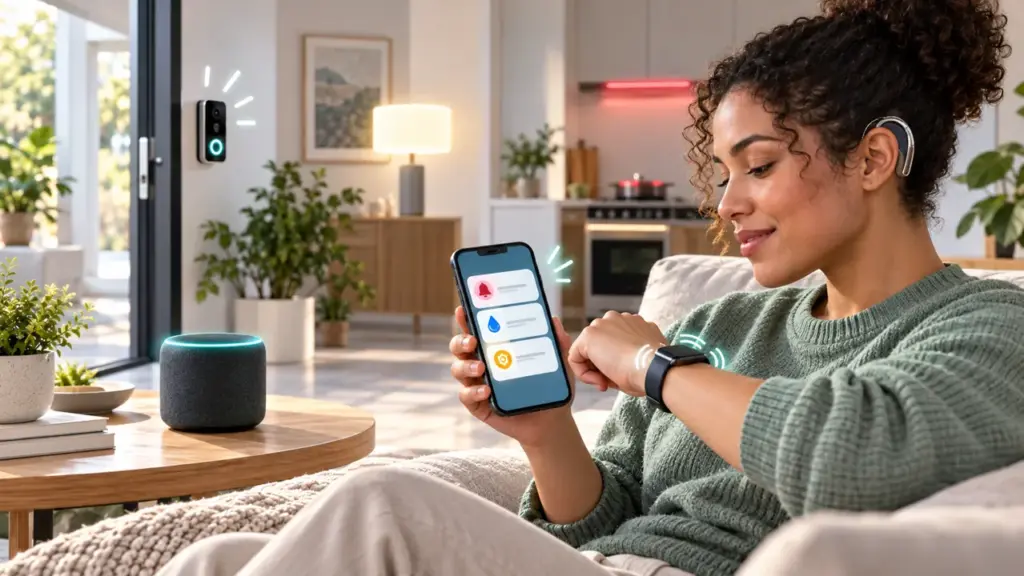
Accessible smart home alerts help households notice events without relying on sound alone. A useful setup can combine visual indicators, vibration, and phone notifications, matched to the person and the room.
The best design starts with the events that matter, from a visitor at the door to a critical home-safety warning. This guide covers practical alert choices, reliability checks, privacy, and the special care required for smoke and carbon-monoxide alarms.
1. Start with the event, not the gadget
List the situations you want to notice before buying anything: a visitor at the door, a phone call, a kitchen timer, a finished appliance cycle, a water-leak sensor, or a security status change.
Note where you may be when an event happens: another room, outdoors, in the shower, or asleep. Separate everyday reminders from urgent warnings so important signals are easier to recognise.
2. Choose accessible alert channels
Visual cues can include a flashing indicator, a display, a compatible lamp, or a dedicated strobe receiver. Haptic cues may come from a wearable or a bed-shaker alerting system designed for that purpose.
A phone or smartwatch can be useful for routine events, but it depends on battery level, notification settings, network availability, and whether the device is nearby. Use more than one channel for events you cannot afford to miss.
3. Everyday setup checks
Put the receiver where you will notice it. Test the alert from different rooms, not only beside the router.
More useful details.
More useful details for the setup.
4. Common household events
For everyday events, choose a receiver that works with your app and place it where it is visible. Confirm that the signal reaches the rooms you use.
On a phone or watch, check that the relevant app is allowed to send notifications and that focus or quiet modes will not hide the ones you need. Use clear event names rather than a generic message whenever the platform allows it.
5. Keep life-safety equipment independent
For fire or carbon-monoxide emergencies, use certified alarm equipment that meets local requirements. Smart-home notifications can add convenience, but they are not a substitute for required alarm systems.
The U.S. Fire Administration recommends smoke alarms on every level, inside bedrooms, and outside sleeping areas, and advises monthly testing. Follow the relevant fire authority and the alarm manufacturer’s instructions for your location.
Depending on individual needs, a specialist visual receiver or a purpose-built haptic alert device may be appropriate. Ask the local fire service or a qualified installer which options are compatible with the existing alarm system.
6. Plan for interruptions and privacy
Map what each alert depends on: sensor, home network, hub, internet service, phone, and receiver. Not every device uses every layer. Read the maker’s documentation to learn what continues working locally and what relies on a cloud service.
Notifications can reveal when people are home or when routines happen. Use unique account passwords, enable multifactor authentication where available, and review app permissions after updates.
Read our smart-home security checklist for basic account safeguards.
See our beginner guide for a simple starting plan.
7. Test the setup in real conditions
Check each room where the alert should be visible. Confirm the event name and make sure the intended receiver shows it.
Repeat the test after replacing a phone, updating an app, changing the router, moving a receiver, or changing notification settings. Keep a brief record of the date and result.
Follow the manufacturer’s approved test procedure for each device. Do not create a real emergency to check an alerting system. If a test fails, correct the issue and repeat the test before relying on the setup.
Common questions
Can a smart light replace a required smoke alarm?
No. A connected light is a convenience layer and can fail if power, network, or settings change. Keep the required alarm equipment in place.
Should I rely on only one notification method?
Usually not. Mobile alerts depend on device settings and battery. A second compatible receiver can make the setup more practical.
How often should I test the setup?
Test a new alert path during setup and after changes to devices, apps, or the network. Test life-safety alarms according to the maker and local fire authority; the USFA recommends monthly smoke-alarm testing.
Official sources
U.S. Fire Administration: Fire Safety for People with Disabilities — alarm placement, testing, and accessible alerting options.
CISA Secure Our World — practical guidance for protecting online accounts and connected devices.
Start with the events that matter, choose accessible cues, and test the complete setup after changes. Keep certified life-safety equipment independent of convenience automations.
When comparing devices, check the alert output, range, power source, setup steps, and whether the system supports more than one receiver. A phone-only option may suit some events, while a dedicated receiver may be easier to notice at home. Confirm compatibility with the exact model and app before buying.
Keep the number of notifications manageable. If every routine sends a phone banner and flashes several lights, people may begin ignoring the system. Use clear labels, reserve the strongest patterns for the most important events, and review the rules after a week of ordinary use.
Consider contrast and placement when using lights or displays. A small indicator may be hard to notice in daylight, while a bright flashing light may be uncomfortable for some people. Choose a cue that is visible from the usual position and adjustable to the household’s preferences.
If several people share the home, agree on what each signal means and who will maintain the system. A short written note with device names, app settings, and test dates helps another household member troubleshoot without guessing.
8. Keep smart home alerts maintainable
Make a short maintenance note for each device: its location, power source, app, and the person who can troubleshoot it. Check battery status and software updates on the schedule recommended by the maker.
When furniture moves or a room changes use, check that the indicator remains visible and the receiver can still be heard or felt as intended. A small layout change can make a previously useful alert easy to miss.
Ask the people using the system whether the signals are easy to recognise and whether any routine creates too many distractions. Adjust the setup based on real use, then test again. The best arrangement is one people understand and can maintain.